Lenovo Partner of the Year Award 2024


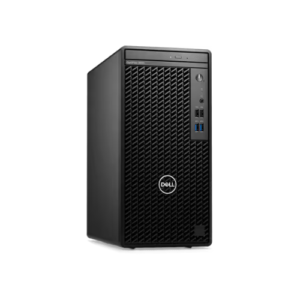
Dell OptiPlex Tower Plus 7020 MFF Intel Core i5-14500 8GB RAM 512GB SSD DOS 3 Year


 WhatsApp

Dell OptiPlex Tower Plus 7020 MFF Intel Core i5-14500 8GB RAM 512GB SSD DOS 3 Year
Features & Design
Resources
Intelligence meets simplicity
Intelligent desktops for every workstyle.
Find your OptiPlex in just two steps: Select your form factor, then choose the right features for the job.
Simplified management: Our new OptiPlex desktops with Intel® Core™ processors (14th gen) feature one BIOS for All-in-Ones and one BIOS across Towers, Small Form Factors and Micro Form Factors.

Why Choose Dell OptiPlex Tower Plus 7020 for Your Business
OptiPlex Towers provide ultimate desktop configurability with the most storage and expansion options. Built to engage with rich content, Towers offer the most performance and graphics options for immersive productivity. Here are the key differences:


Immersive User Experience with Dell OptiPlex Tower Plus


Get the most out of your OptiPlex
Supports 4 displays: Integrated graphics support for up to 4 simultaneous displays with up to 4K resolution.
Stunning views: Experience 5K resolution with optional DisplayPort.
Immersive content: Next generation discrete graphics, ready for graphic intense workloads and rich content.
Stay in your flow: Work without interruption with devices that seamlessly connect and interact.
Your OptiPlex workspace pairs perfectly with Dell Wireless Headset, Dell Speakerphone and Dell UltraSharp webcam.
Enhance Your Workspace with Dell OptiPlex Tower Plus 7020


Modern device management
Single BIOS strategy: OptiPlex makes it easier for IT admins to manage numerous devices.
OptiPlex offers one BIOS for All-in-Ones, and one BIOS across Towers, Small Form Factors and Micro Form Factors.
Dell Manageability Solutions: Designed to allow IT admins to deploy drivers, configure BIOS,
monitor devices, and manage updates – reliably and easily,
all while integrating with existing endpoint management solutions.
Dell offers the industry’s first Binary Large Object (BLOB) package-based solution, for securely configuring & managing endpoints, using Microsoft Intune.
Dell Trusted Update Experience: All new offering simplifies the update experience for your fleet of devices.
We package the latest BIOS, drivers, and firmware versions for our customers – with Dell-exclusive capabilities.

Dell Trusted Devices
OptiPlex is a part of the industry’s most secure commercial PC family from Dell, with built-in security features that keep you protected and give you visibility to threats for swift action. OptiPlex customers trust our secure desktop solutions, featuring TPM 2.0, lockable cable covers and mounts, smart authentication options and chassis intrusion switches.
Be secure from first boot: Rigorous, state-of-the-art supply chain controls and Dell-unique Secured Component Verification reduce the risk of product tampering.
Stay protected from evolving threats: Only Dell offers off-host BIOS and firmware verification,
providing greater security than other PCs. Comprehensive security support further minimizes the risk of attack in-use.
Early-alert threat detection: Indicators of Attack, an early-alert feature offered only by Dell,
scans for behavior-based threats before they can do damage, e.g., BIOS attacks, chassis intrusion.
Safeguard user credentials: Our unique security chip offers an extra, hardware-based layer of security against credential theft.

Advancing Sustainability

Accelerate business success with Copilot and Windows 11 Pro
AI-powered multi-tasking mastery for a new way of working with Windows 11 Pro. With features like Copilot in Windows,
get better answers, grow your skills, and effortlessly optimize workflows. Windows 11 Pro on Dell PCs come with the
latest advances in security and AI delivered conveniently to your desktop. Benefit from AI-enhanced efficiency,
performance, and security today, and innovate to take on new challenges tomorrow.

Dell APEX PC-as-a-Service

Ports & Slots
2. Power Button
3. Storage Activity Light
4. SD Card Slot (optional)
5. Universal Audio Jack
6. USB 2.0 Port
7. USB 2.0 Port with PowerShare
8. USB 3.2 Gen 2 Port
9. USB 3.2 Gen 2×2 Type-C Port
11. Serial Port (optional)
12. 3x DisplayPort 1.4a Ports (each up to 4096 x 2304 @60Hz)
13. Video Port (optional)HDMI 2.1: up to 4096 x 2160 @60HzDisplayPort 1.4a: up to 5120 x 3200 @60HzVGA: up to 1920 x 1200 @60HzUSB Type-C with DisplayPort Alt mode: up to 5120 x 3200 @60Hz
14. USB 3.2 Gen 2 Type-A Port
15. 3x USB 3.2 Gen 1 Type-A Port
16. 2x USB 2.0 with SmartPower On
17. 4x Expansion Slots
18. Power Cord Connector
19. Power Supply Diagnostic Light
20. Release Latch
21. Padlock Ring
22. RJ-45 Ethernet
23. Kensington Security Cable Slot

Dimensions & Weight
2. Depth: 11.84 in. (300.80 mm)
3. Width: 6.65 in. (169.00 mm)
Weight (max): 21.24 lbs. (9.63 kg)
OptiPlex Tower Plus 7020 XCTO
- Intel Core i7 processor 14700 vPro (33 MB cache, 20 cores, 2 8 threads, up to 5.4 GHz Turbo , 65W)
- Intel Integrated Graphics
- 8 GB: 1 x 8 GB DDR5
- M.2 2230 512GB PCIe NVMe SSD Class 25
- OptiPlex Tower Plus with 260W Bronze Power Supply
- Trusted Platform Module (Discrete TPM Enabled)
- No AutoPilot
- Intel Core i7 Processor Label
- Quick Start Guide, OptiPlex Tower Plus
- EU Batteries Regulation techsheet
- No Additional Cable
- No Media Card Reader
- EPEAT 2018 Registered (Silver)
- No Additional Add In Cards
- ENERGY STAR Qualified
- No UPC Label
- Regulatory Label for UAE DIB
- Regulatory Label for UAE PKG
- Regulatory Label for OptiPlex Tower Plus 7020 260W PSU
- No Additional Hard Drive
- iRST not selected
- No Optical Disk Drive
- European Power Cord
- No PCIe add-in card
- No Additional Video Ports
- Internal Speaker
- No Additional Network Card Selected (Integrated NIC included)
- No Wireless LAN Card
- Dell Optical Mouse-MS116 – Black
- Dell Multimedia Keyboard-KB216 – Arabic (QWERTY) – Black
- No Hard Drive Bracket
- Ubuntu 22.04 LTS
- OS-Windows Media Not Included
- No Productivity Software
- No vPro support
- CMS Software not included
- No Anti-Virus Software
- No Intel Connectivity Performance Suite
- No Additional Software
- 1st M.2 2280 SSD Screw
- Dell Order
- Futuristic Order Flag SKU
- BTO Ocean shipment, longer leadtime, DT
- Custom BTO Configuration
- System Monitoring not selected in this configuration